Have you ever tried editing a property video with a general-purpose tool? It often feels like you're trying to assemble IKEA furniture with nothing but a pocket knife. You might get there eventually, but it’s going to be frustrating, slow, and the final product probably won't look as polished as you'd hoped.
This is where specialized real estate video editing software comes in. Think of it less like a generic multi-tool and more like a purpose-built toolkit, designed specifically to create stunning property videos without the headache.
Why Generic Video Editors Fall Short in Real Estate
If you've ever fired up a professional editor like Adobe Premiere Pro, you know that feeling of being instantly overwhelmed. You're faced with a mountain of menus, timelines, and features built for Hollywood filmmakers, not for a real estate agent trying to get a listing live before the end of the day.
While these tools are incredibly powerful, they often create more problems than they solve for real estate professionals. The learning curve is steep, and what should be simple tasks can end up taking hours.
Specialized real estate video editing software flips the script entirely. It's designed from the ground up to solve the exact problems you face when marketing a property. Instead of forcing you to fix every little issue manually, it offers smart, one-click solutions that save you time and deliver a better result.
Built for Speed and Simplicity
The real magic is in the workflow. General editors give you a blank canvas—great for creative freedom, but a huge time sink. Real estate-specific platforms, on the other hand, provide a guided, streamlined path.
Here’s what that looks like in practice:
- Shaky Walkthroughs: Forget trying to figure out complex stabilization trackers. A specialized tool can smooth out that wobbly phone recording with a single click.
- Poor Lighting: No need to become a color grading expert. Smart presets can instantly brighten a dim living room or fix the weird color tint from indoor lights.
- Repetitive Branding: Adding your logo, contact info, and brokerage details to every single video is a grind. These platforms automate it, applying your branding consistently every time.
A great way to think about it is this: a generic editor gives you all the raw ingredients and expects you to be a master chef. A real estate video editor hands you a premium cake mix with foolproof instructions, guaranteeing a fantastic result without the culinary degree.
To make this even clearer, let's look at a side-by-side comparison.
General vs Real Estate Specific Video Software
The table below breaks down the key differences between a jack-of-all-trades video editor and a tool built just for you.
| Feature Category | General Video Editors (e.g., Premiere Pro) | Real Estate Specific Software |
|---|---|---|
| Learning Curve | Steep; requires extensive training | Intuitive; designed for quick adoption |
| Core Workflow | Manual; user controls every detail | Automated; guided with presets and templates |
| Key Features | Advanced visual effects, multi-cam editing | One-click stabilization, lighting correction, branding kits |
| Project Time | Hours to days per video | Minutes per video |
| Target User | Professional videographers, filmmakers | Real estate agents, photographers, marketers |
As you can see, the choice isn't about which is "better," but which is the right tool for the job. For real estate, the answer is almost always the specialized software.
Meeting Modern Market Demands
The push for high-quality video isn't just a fleeting trend—it's what buyers and sellers expect, and it has a real impact on your bottom line. The global video editing software market was valued at $3.38 billion in 2024 and is expected to keep growing, largely because industries like real estate depend so heavily on visual marketing.
Tools like AgentPulse are built to help you meet this demand by getting rid of the technical roadblocks. They focus on features that make your listings look amazing, like AI that can turn your static photos into a dynamic, cinematic video tour. This approach means you can spend less time fighting with software and more time doing what you do best: connecting with clients.
To get a complete picture, check out our full guide on real estate video editing. Ultimately, the right software gives you a massive advantage, helping you move past time-consuming technical hurdles and start producing professional-quality marketing in a market that never slows down.
Must-Have Features for Videos That Actually Sell Homes
When you're looking for the right video editing software, it's easy to get lost in a sea of features. But for real estate, a few key tools make all the difference. These aren't just flashy add-ons; they're specifically designed to make properties look their best and capture a buyer's imagination.
Think of it like this: anyone can snap a photo of a room, but a professional real estate photographer uses special lenses, lighting, and editing to make that same space feel bright, spacious, and inviting. The right software is your professional toolkit, turning raw clips into a compelling story that connects with viewers.
The goal isn't to become a Hollywood film editor. It's about using smart, simple tools to get polished, professional results—fast. Let's look at the features that matter most.
From Shaky Walkthroughs to Cinematic Tours
Nothing screams "amateur" like shaky video. If you're shooting a walkthrough on your phone or even a handheld camera, a little bit of jitter is inevitable. Unfortunately, that unstable footage can make a beautiful home feel chaotic and unprofessional, which is an instant turn-off for potential buyers.
This is where AI-powered stabilization is an absolute game-changer.
The software intelligently analyzes your wobbly clips frame by frame, smoothing out the bumps and jitters. What you get is that seamless, gliding motion you see in high-end property videos. It transforms a rough, handheld tour into a smooth, cinematic experience that feels premium and draws the viewer in.
- Before Stabilization: The video is jarring, like you're watching from the passenger seat on a bumpy road. It's hard to focus on the home's best features.
- After Stabilization: The motion becomes fluid and graceful, guiding the eye effortlessly from one room to the next.
This one feature alone can dramatically elevate the quality of your video, making it look like it was shot by a professional crew, even if it was just you and your smartphone.
Setting the Mood with Perfect Light and Color
In real estate, lighting is everything. A dark, shadowy room feels cramped and gloomy, while a bright, airy space feels warm and welcoming. But getting the lighting just right on camera is a huge challenge, especially on overcast days or in rooms with mixed light sources.
That’s why one-click color correction and lighting presets are so essential. Instead of getting bogged down in complicated color wheels and exposure settings, you can apply professionally designed filters that instantly make your footage look better.
A good preset can brighten up a dim living room, get rid of the weird yellow cast from indoor lights, or make the greens in a backyard pop. It’s like having a virtual lighting expert on call to make sure every single room is shown in its absolute best light.
Many modern platforms, like AgentPulse, even use AI to analyze your footage and suggest the best enhancements for each clip. This takes all the guesswork out of the equation. You can learn more about how AI can transform your real estate videos in our complete guide. This kind of smart automation doesn't just save a ton of time; it also ensures your videos have a consistent, high-quality look.
Automation That Saves You Time and Builds Your Brand
Building a recognizable brand means being consistent. Viewers should immediately recognize your videos, which means always including your logo, contact info, and brand colors. But adding all those details to every single video by hand is tedious and a recipe for mistakes.
This is a problem that modern video software solves with a few clever features:
- Automated Branding Kits: You just upload your logo, brand colors, and fonts once. The software then automatically applies them to all your future videos. Perfect branding, zero extra work.
- Curated Music Libraries: Finding the right background music is tough. You can't just use any song without risking a copyright strike. The best platforms offer built-in libraries of royalty-free music that's cleared for use on the MLS, Zillow, and social media.
- Drag-and-Drop Templates: Need a quick video for an Instagram Story or a property highlight reel for YouTube? Pre-built templates give you a ready-made structure. Just drop in your clips, and you’ll have a perfectly formatted, polished video in minutes.
These automated tools are becoming the new standard. By taking care of the boring, repetitive tasks, the software frees you up to focus on what really matters: telling a great story about the property.
A Simple Workflow from Shoot to Final Cut
Creating a slick property video doesn't have to be a technical headache. When you have the right real estate video editing software, the process turns into a clear, repeatable roadmap instead of a chaotic mess. Let's walk through the entire journey, from raw footage to a final cut that actually grabs a buyer's attention.
The work starts long before you even press record. A little bit of planning upfront can save you hours of headaches later. Think of it like making a grocery list before you go to the store—it just makes sure you don't forget the important stuff.
Here’s a simple pre-production checklist to get you started:
- Make a Simple Shot List: Jot down the key rooms and features you absolutely need to capture. This means getting wide shots of each room, close-ups of cool details like a fireplace or custom countertops, and of course, great exterior shots for that all-important curb appeal.
- Check Your Lighting: Always try to film during the day when you can get the best natural light. Throw open the blinds and turn on every light in the house. You want each space to feel bright and welcoming.
- Prep the Property: A quick declutter and a bit of staging can make a world of difference. Make sure the home is sparkling clean and looking its best before your camera comes out.
From Raw Clips to a Polished Story
Once you've got your footage, the real magic happens in the editing software. A platform built specifically for real estate will guide you through the process, making what seems complex feel surprisingly simple. The first step is always organization—just import all your video clips into the project to get started.
Next, you'll begin piecing the story together. Modern software makes this easy with pre-built templates designed for things like property tours or quick social media clips. You literally just drag and drop your clips into a timeline, and the software helps build the flow. For example, a template might start with a great shot of the front of the house, move smoothly through the main living areas, and wrap up with a call to action.
After you've got the basic structure, it’s time to polish it up. This is where specialized software really starts to pay for itself. The core steps are all about turning basic footage into something that looks truly professional.
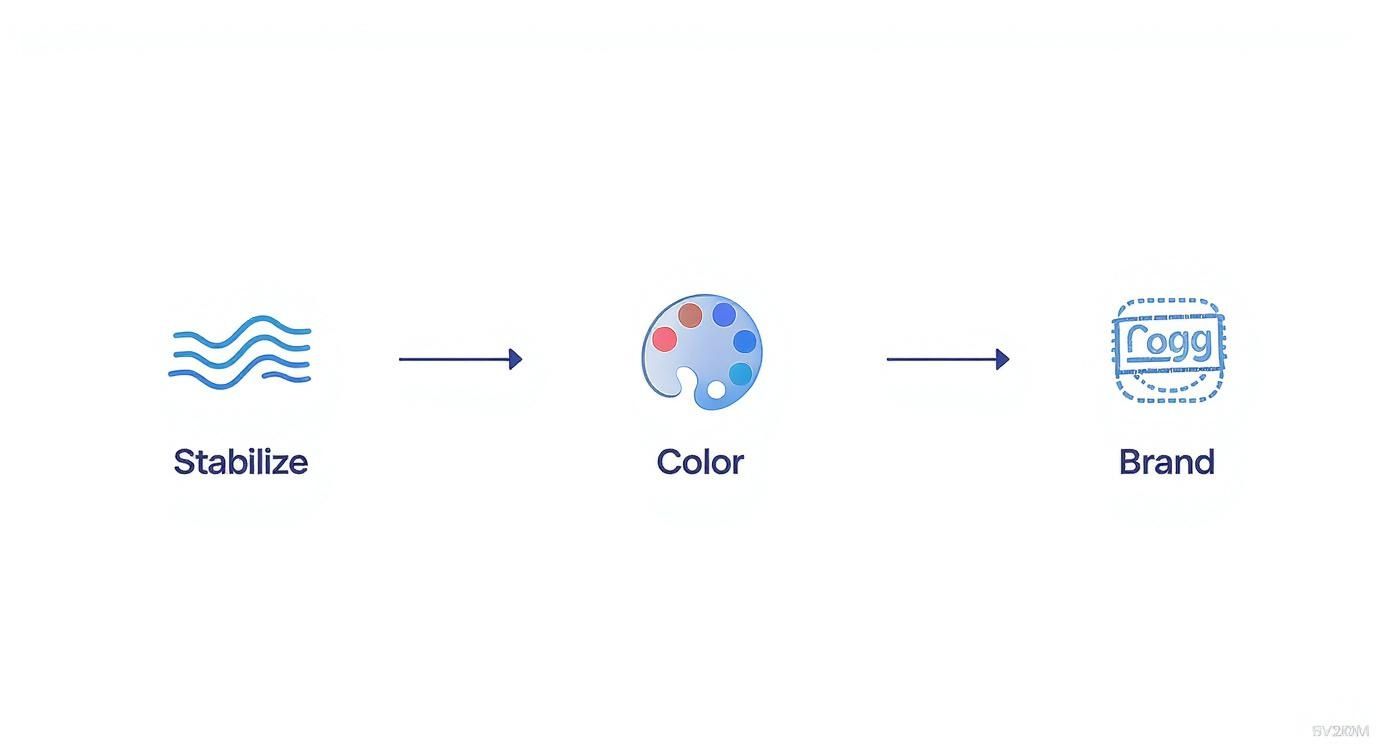
This simple three-part process—fixing shaky footage, correcting the color and lighting, and adding your branding—is the foundation of every great real estate video.
Finalizing and Exporting Your Masterpiece
With the visuals looking sharp, the next step is adding sound. The right background music is crucial for setting the mood. Good real estate video editing software will come with a library of royalty-free tracks, so you don't have to worry about copyright strikes when you post your video. Then, you'll add your branding elements, like your logo and contact info, so every viewer knows exactly who to call.
The very last step is exporting the video. This used to be a super confusing process filled with technical terms like codecs and bitrates. Not anymore. Now, it’s as simple as clicking a button.
Modern platforms offer one-click export settings already optimized for different channels. Need a high-res version for Zillow? A square format for your Instagram grid? A vertical clip for TikTok? The software handles all the technical details for you.
This whole workflow proves you don't need to be a video pro to create marketing content that works. By breaking it down into simple stages—planning, building, polishing, and exporting—you can create incredible listing videos without wasting a ton of time.
If you want to go even deeper, you can discover how to choose the perfect real estate video editor for what you need. The right tool makes this entire process something any agent can master.
How to Choose the Right Software for Your Business
Picking the right video editing software is a lot like buying a car. You wouldn't get a two-seater sports car if you have a family of five to haul around. The best vehicle is the one that actually fits your life, your budget, and what you’ll be doing with it. The same exact logic applies to the software you choose for your business.
A powerful, complex tool with a million features might look impressive, but if it takes you a week just to figure out the basics, it’s not helping you sell homes. The real goal is to find something that slides right into your workflow, saves you precious time, and cranks out professional videos that get buyers excited. This guide will help you look past the flashy marketing and find a tool that genuinely works for you.
Evaluate Your Skill Level and Time Commitment
Before you even glance at a feature list, have an honest conversation with yourself. How tech-savvy are you, really? And how much time can you realistically set aside for editing videos?
Are you a total beginner who just wants to click a few buttons and have a great-looking video pop out? Or are you comfortable in the digital weeds, wanting total control over every transition and color grade? Answering this question is the single most important step in narrowing down your options.
- For the Busy Agent (Beginner): If video is new territory, your top priority should be simplicity. Look for platforms with drag-and-drop editors, ready-made templates, and maybe even some AI assistance. Tools like Animoto, Magisto, or our own AgentPulse are built for this—they do the heavy lifting so you can get a polished video done in minutes, not hours.
- For the Power User (Advanced): If you've dabbled in editing before and want full creative freedom, then professional-grade software like Adobe Premiere Pro or Final Cut Pro is probably more your speed. These tools let you customize everything, but be warned: they come with a much steeper learning curve and require a serious time investment to master.
Your time is your most valuable asset. The "best" software isn't the one with the most buttons; it's the one that gives you the best return on your time by producing high-quality marketing with the least amount of friction.
Analyze Key Technical and Performance Metrics
Once you know what category of software fits your skill level, it’s time to get into the nuts and bolts. These are the technical details that directly affect your final video and, just as importantly, your workflow. Don’t just look at what a tool can do—look at how well and how quickly it does it.
A few critical things to check:
- Rendering Speed: This is a big one. How long does the software take to export your final video? A five-minute 4K property tour can take hours to render on slow software, creating a huge bottleneck in your day. Cloud-based platforms often handle this on their powerful servers, which is usually way faster than tying up your own computer.
- Output Formats: Can you export your video for Zillow, YouTube, and Instagram with a single click? Manually reformatting a video for different aspect ratios is a massive time-suck. A good tool will have built-in presets for landscape (16:9), square (1:1), and vertical (9:16) videos.
- Music and Asset Licensing: This is non-negotiable. Does the software include a library of royalty-free music that is legally cleared for commercial use? Using a popular song without the right license can get your video taken down and even land you in legal hot water.
Align Pricing Models with Your Business Goals
Finally, let’s talk money. You need to see how the software's cost fits into your budget and business plan. Most tools fall into one of two camps: a recurring subscription or a one-time purchase.
- Subscription (SaaS): This is the most common model, where you pay a monthly or annual fee. The upside is that you get regular updates, cloud storage, and support. It's a great way to stay on top of the latest features and spread the cost out.
- One-Time Purchase: Software like Final Cut Pro has you pay a larger fee upfront. You own that version of the software forever, but you’ll likely have to pay again for major upgrades down the road.
When you're looking at the price, think about the value, not just the cost. If a $30 per month subscription saves you five hours of work every month, that’s an investment that pays for itself many times over. By carefully weighing your skills, technical needs, and budget, you can confidently pick the right video editing software to grow your business.
Practical Tips for Standout Property Videos
Having the right real estate video editing software is a huge piece of the puzzle, but incredible videos always start with great footage. The good news? You don't need a Hollywood budget or a full film crew to make your listings look amazing.
Focusing on a few simple techniques while you're shooting—and then again in the editing room—can completely change the game. These tips are designed to give you an immediate boost, helping you create videos that feel professional and truly connect with potential buyers. The whole point is to make a house feel like a home, turning a simple tour into an experience.
Capture the Best Light and Space
The foundation of any great property video is the way you frame the space. Just two small adjustments can make rooms feel bigger, brighter, and way more welcoming.
Shoot During the "Golden Hour"
This is that magical time just after sunrise or right before sunset when the daylight is soft and warm. Filming then bathes a property in a beautiful, natural glow that's nearly impossible to fake with editing or artificial lights. Exteriors look stunning, and interiors feel cozy and inviting.Use a Wide-Angle Lens
A subtle wide-angle shot can make rooms feel much more open and spacious. Most modern smartphones have this feature built right in. Just be careful not to go too wide, which can distort the room's proportions. A modest wide shot helps capture the full scale of a room, giving buyers a much better sense of the layout.
Keep the Pace Quick and Engaging
Let's be honest, attention spans are short. A slow, meandering video is a surefire way to get someone to click away. The trick is to keep your video punchy and concise, showing off the best features without dragging it out.
The demand for professional video has exploded. In fact, 80% of consumers watch online videos that influence what they buy. Keeping your content snappy is the only way to hold their attention. You can read more about the impact of video on buyers from dataintelo.com.
To keep viewers hooked, make your individual shots short. Aim for clips that are only 3–5 seconds long before you cut to a new angle or a different room. This quick pacing creates a sense of energy and momentum, pulling the viewer through the tour and keeping them interested right to the very end. It’s a simple editing trick that makes a world of difference.
Perfect the Finishing Touches in Post-Production
Once you’ve got your raw clips, the final polish you add in your editing software is what brings it all together. This is your chance to add that professional sheen that builds excitement and trust.
- Select Complementary Music: The right background music sets the entire mood. A modern, minimalist home might work well with an ambient electronic track, while a classic colonial could use something more like light orchestral music. Just pick a track from your software's royalty-free library that fits the property's unique style.
- Craft a Clear Call-to-Action (CTA): What do you want people to do after watching? Don't leave them guessing. Every video should end with a clear, direct CTA. Add simple text on the screen with your name, phone number, and a prompt like, "Schedule Your Private Showing Today."
When you combine smart shooting techniques with thoughtful editing, you can create property videos that don't just look incredible—they get results.
Common Questions About Real Estate Video Software
Jumping into the world of real estate video can feel a little overwhelming. You’ve probably got questions about everything from the right gear and potential costs to the best way to film a property. It's completely normal to want some straight answers before you dive in.
This section is here to clear things up. We’ll tackle the most common questions agents have when they start looking at real estate video editing software. Think of it as your practical, no-nonsense guide to getting started.
Do I Need Expensive Camera Gear to Create Good Real Estate Videos?
Absolutely not. This is one of the biggest myths that holds agents back from using video. While a fancy DSLR or a high-end mirrorless camera can certainly produce gorgeous footage, it’s not a must-have to create a professional-looking property tour.
Believe it or not, the smartphone in your pocket is an incredible video camera. The latest iPhones and Samsung Galaxy devices shoot in stunning 4K, capturing all the detail and color you need. The trick isn't having the most expensive equipment, but learning how to use what you already have.
The real transformation happens in the editing suite. Good real estate video editing software is built to take raw footage from any device—a smartphone, a drone, or a DSLR—and make it shine.
When you're filming, just focus on two things: getting plenty of natural light and keeping your shots as steady as you can. A simple, cheap gimbal for your phone can make a world of difference. Once you have the footage, let the software do the heavy lifting with color correction and stabilization.
Tools that use AI are especially great for this. They can automatically smooth out a wobbly walkthrough, brighten up a dim living room, and give your phone footage that polished, cinematic feel that really wows buyers and sellers.
How Long Should a Property Listing Video Be?
There’s no magic number here. The right length for your video really depends on where you’re going to post it. You need to match the video’s duration to what people expect on that specific platform. A one-size-fits-all video just won't cut it.
Think of it this way: you wouldn't hand a 10-page detailed brochure to someone just walking by, but it’s perfect for a serious buyer at an open house. Your video strategy needs that same kind of thinking.
Here’s a quick guide to video lengths:
- Primary Listings (Zillow, MLS, Your Website): Aim for 2-3 minutes. This is the sweet spot for a full walkthrough, giving you enough time to showcase all the key features without boring the viewer.
- Social Media Feeds (Instagram, Facebook): Shorter is better. A highlight reel around 60-90 seconds works great for catching someone's eye as they scroll.
- Short-Form Video (Reels, TikTok, Shorts): Keep it fast and punchy. You’re looking for dynamic clips between 15-30 seconds. Think quick cuts, upbeat music, and the most eye-catching shots of the home.
The best video software makes this super easy. Look for tools with built-in templates that let you quickly chop up your main video tour into shorter clips perfect for social media. You get way more mileage out of your content without having to do three times the work.
Can I Use Free Video Editing Software for My Business?
You can, but it's usually a bad idea. While the idea of "free" is tempting, free video editing tools often cause more headaches than they're worth for a professional real estate business. Their limitations can end up hurting your brand and wasting your valuable time.
Most free editors are made for casual home videos, not professional marketing. That means they're missing the key features you need to make a property look its best, like advanced color presets for interiors, one-click AI stabilization, or tools to easily add your branding.
Even worse, many free programs will slap their watermark all over your finished video. Nothing screams "amateur" to a potential client faster than a watermark from a free editing tool. It instantly devalues your brand and might make sellers think twice about the quality of your marketing.
You should think of specialized video software as a necessary business expense, just like your CRM or professional photographer. That small investment pays you back with huge time savings, consistent branding, and top-tier marketing that helps you attract serious buyers and win more listings.
What Is the Difference Between an AI Video Editor and a Traditional One?
The biggest difference comes down to who’s doing the work. A traditional editor gives you a blank slate and a complex toolbox, expecting you to do everything manually. An AI editor acts more like a skilled assistant, automating the most tedious and technical parts for you.
With a traditional editor like Adobe Premiere Pro, you have total control over every single frame, color, and sound. That's amazing if you're a professional filmmaker, but for a busy agent, it means a steep learning curve and hours spent on every single video.
An AI-powered editor is built for speed and efficiency. It uses smart technology to handle the boring stuff automatically. For a real estate video, that means the AI can:
- Stabilize a shaky walkthrough clip.
- Brighten the lighting in a dark room.
- Suggest background music that fits the video's mood.
- Even create an entire video tour from your still photos.
The point of an AI editor isn't to take away your creativity. It's to handle the technical grunt work so you can focus on telling the property's story. It lets you produce professional-quality videos in a fraction of the time it would take with a traditional program.
Ready to create stunning property videos from just your listing photos? With AgentPulse, you can turn static images into dynamic, engaging video tours in minutes. No editing skills required. Try AgentPulse today and see how easy it can be.