
Figuring out the best virtual tour software really comes down to what you're trying to accomplish. If you want a deep, immersive experience where buyers can walk through a property themselves, something like Matterport is the gold standard. But if your goal is to create slick, cinematic video tours from photos you already have—perfect for social media and ads—then an AI-powered tool like AgentPulse is a much better fit. This guide will walk you through the key differences so you can pick the right tool for your real estate business.
How to Choose the Right Virtual Tour Software

Not too long ago, virtual tours were a nice-to-have. Now, they're an absolute must. They give potential buyers a chance to explore a property from their couch, which expands your reach and helps qualify leads before they ever book a showing. But with so many options out there, it’s easy to get overwhelmed.
This guide gives you a clear framework for picking the best virtual tour software for your specific needs. We'll go beyond just listing features and actually compare the different approaches, from complex 3D models to quick AI-generated videos.
Understanding the Different Approaches
The term "virtual tour" is pretty broad and can mean a lot of different things. Each type serves a unique purpose, requires different time and money commitments, and gives the buyer a completely different experience. Getting a handle on these distinctions is the first step to making a smart choice that fits your marketing plan.
The numbers don't lie. The global virtual tour market was valued at USD 11.06 billion in 2024 and is expected to explode to USD 83.25 billion by 2032. That massive growth shows just how vital it is for agents to get this right. You can dive into the full research about virtual tour market growth to see the trends for yourself.
To make things simpler, let's break down the main software types by what they produce and how they're made.
| Tour Type | Primary Output | Creation Process | Best For |
|---|---|---|---|
| 3D Tour Builders | Interactive 3D Model | On-site scanning with a special camera | Immersive, self-guided property exploration. |
| 360° Tour Platforms | Clickable Panoramas | Linking 360° photos with "hotspots." | Custom branding and guided navigation. |
| Photo-to-Video Engines | Cinematic Video File | AI processing of standard still photos. | Fast, engaging social media & ad content. |
| Guided Walkthroughs | Traditional Video | Filming a walkthrough with a camera. | Storytelling and highlighting key features. |
The key is to match the software's strengths to your listing's needs. A luxury estate benefits from a detailed 3D model, while a standard rental property gets more value from a quick, shareable video tour.
Our goal here is to give you the tools to weigh each option based on what actually matters to your business. As we go, keep these questions in mind:
- How much time can I realistically spend creating each tour?
- What's my budget per listing for this?
- Do I have the right equipment or technical skills?
- Where will I be sharing these tours most often (MLS, social media, my website)?
Answering these will help you cut through the marketing fluff and zero in on a solution that will actually deliver a return on your investment. In the next sections, we’ll take a closer look at each of these tour types and compare some of the leading software out there.
A Breakdown of the 4 Main Types of Virtual Tours
Choosing the best virtual tour software really starts with understanding one key thing: not all "virtual tours" are created equal. The tech, the time it takes, and what the buyer actually experiences can be wildly different.
Let's break down the four main approaches agents use to create digital property showcases. We'll look at everything from simple photo-to-video tools to full-blown 3D models. The goal is to help you match the right tool to your budget, your schedule, and the story you want to tell for each listing.
1. Photo-to-Video Engines
This is a newer approach that’s all about speed and efficiency. The concept is simple: you take the professional still photos you already have for a listing and upload them. The software then uses AI to turn those static images into a smooth, cinematic video walkthrough.
Platforms like AgentPulse use a 3D-aware engine to analyze the geometry in each photo, letting it create realistic camera movements like pans, tilts, and glides. The result feels like a professionally shot video tour, but it's done in just a few minutes without ever having to go back to the property.
This method is a game-changer for creating quick, engaging content for social media feeds, digital ads, and MLS listings where video gets a major boost. It gives you a high-quality video for every single property, not just your luxury listings, making it a super scalable marketing tool.
2. True 3D Tour Builders
When you hear people talk about those immersive, walk-around tours where you control every step, they're talking about a 3D tour. Matterport is the undisputed leader in this space, creating a complete "digital twin" of a property that buyers can explore on their own terms.
The process is much more involved, though. It requires a special 360° camera to methodically scan each room from multiple points. The software then stitches all these scans together into an interactive 3D model, giving you that signature "dollhouse" view that helps buyers understand the home's layout in a way nothing else can.
While incredibly impressive for high-end or architecturally unique homes, the investment in time and equipment makes 3D tours less practical for the average listing. A full scan can easily take several hours on-site, plus processing time, positioning it firmly as a premium marketing service.
3. Interactive 360° Tours
Think of interactive 360° tours as a happy medium between static photos and a full 3D model. Software like Kuula or CloudPano lets you link a series of panoramic 360° photos together using clickable "hotspots."
A viewer can stand in one spot, look all around, and then click a hotspot to jump to the next room or viewpoint. It creates a great sense of exploration without the heavy technical lift of a complete 3D scan. You still need a 360° camera, but the on-site work is generally faster and gives you more creative freedom.
This approach is fantastic when you want to guide a buyer’s attention. You can embed videos, add text descriptions, or even link out to a manufacturer's website for a specific appliance, all within the tour. It's a flexible option that balances immersion with a more manageable creation process.
4. Guided Video Walkthroughs
This is the classic, old-school method: a guided video walkthrough, typically filmed on a smartphone or a professional video camera. It’s where you, the agent, or a videographer physically walks through the property, narrating the experience and pointing out all the best features.
The biggest strength here is storytelling. It’s your chance to inject your personality, build a connection with the viewer, and make sure they don’t miss the subtle details that make the home special. It’s a personal touch that none of the automated tour types can truly replicate.
The downside? Quality can be all over the place. A shaky, poorly lit video can do more harm than good, which is why a gimbal or a steady hand is almost a necessity. It’s also a much more manual process, involving time on-site to film and then time at the computer to edit it all together.
To make sense of these options, here's a quick table to see how they stack up against each other.
At-a-Glance Comparison of Virtual Tour Types
Use this table to quickly compare the core characteristics of each virtual tour creation method and determine the best fit for your real estate marketing strategy.
| Tour Type | Best For | Required Equipment | Creation Time | Typical Cost |
|---|---|---|---|---|
| Photo-to-Video Engine | Quick, engaging video for ads & social media. | Standard property photos. | 2-5 minutes. | Low (Subscription) |
| 3D Tour Builder | Immersive, self-guided exploration for premium listings. | Specialized 360° camera. | Several hours. | High (Per scan + hosting) |
| 360° Tour Platform | Guided navigation with interactive, branded hotspots. | 360° camera. | 1-2 hours. | Medium (Per tour/sub) |
| Guided Video Walkthrough | Agent-led storytelling and building personal connection. | Smartphone or video camera. | 1-3 hours. | Varies (DIY to Pro) |
Ultimately, there's no single "best" option—it all comes down to the specific property, your marketing goals, and where you want to invest your time and money.
What to Look for in Virtual Tour Software
When you're shopping for virtual tour software, it's easy to get distracted by flashy features. But what really matters is how a tool impacts your day-to-day work, your budget, and ultimately, your sales. A platform might create a beautiful tour, but if it takes you half a day to build or ties you up in weird usage rules, it’s not the right tool for the job.
You need a clear checklist. Software solutions have taken over this space, capturing more than 60% of the market share in 2023 by adding things like 360-degree views and clickable hotspots. Knowing what to look for helps you cut through the noise. To get a better sense of the industry, check out this report on the virtual tour software market landscape.
Output Quality and Formats
First things first: what does the software actually produce? And can you use it where you need it most? The biggest difference you'll find is between a self-contained interactive player and a simple video file.
- Interactive Players: Think of platforms like Matterport. They build an immersive, clickable model of the home that clients can explore on their own. While very cool, this format often can't be uploaded directly to your Instagram feed or the MLS video slot.
- Video Files (MP4): Tools like AgentPulse, on the other hand, generate a standard MP4 video. This is the universal format that works everywhere—Facebook, Zillow, YouTube, you name it. It's built for maximum exposure where buyers are already scrolling.
Ask yourself where you get the most traction. If your audience lives on social media, a tool that outputs a ready-to-post video is a must-have.
Speed and Ease of Use
Let's be honest, you don't have time to become a video editor. A powerful tool with a steep learning curve or one that requires hours of tedious work for each listing just isn't practical for a busy agent.
Think about the total time commitment. A full 3D scan can easily eat up an entire afternoon between the on-site work and the processing time. Contrast that with an AI-powered photo-to-video tool that can spin up a polished, cinematic walkthrough in under five minutes, using the listing photos you already have. That kind of speed means you can create compelling video tours for every listing, not just your luxury properties. You can learn more about this approach in our guide to real estate video software.
The right software should feel like a superpower, not another chore. Focus on solutions that simplify your workflow and give you professional results without demanding all your time.
Pricing and Scalability
Virtual tour software pricing generally comes in two flavors, and the difference can have a huge impact on your bottom line.
- Per-Tour or Per-Scan Fees: This is the old-school model common with high-end 3D scanning. It seems flexible at first, but the costs add up fast, making it a poor fit if you want to market every single property consistently.
- Subscriptions: Most modern platforms operate on a monthly or annual subscription. This gives you a predictable marketing expense and usually allows for a set number of tours or even unlimited creation, encouraging you to make your marketing uniform and professional across the board.
Always look at the total cost of ownership. A reasonable monthly fee for unlimited videos almost always delivers a better return than a pricey pay-per-tour model.
Marketing Rights and Integrations
Finally, read the fine print. What can you actually do with the tour once it's finished? Some platforms hit you with restrictive terms that limit where and how you can share the final product. You want a tool that gives you full, unencumbered marketing rights. You created it, you should own it.
Also, check how well it plays with others. The best software makes it incredibly simple to get your tour onto the big portals like Zillow and your local MLS. The whole point is to get your listing in front of as many potential buyers as possible with zero hassle. A simple "Download MP4" button can be far more valuable than a dozen features you'll never use.
An In-Depth Comparison of Top Virtual Tour Solutions
Now that we've nailed down what to look for, let's put some of the biggest names in real estate virtual tours to the test. The truth is, choosing the best virtual tour software isn't about finding one tool that does it all. It’s about matching the right tool to the right property and your specific marketing goals.
This isn't just a feature-for-feature rundown. We're going to get into the nitty-gritty of why a powerhouse like Matterport is perfect for one listing, while a flexible tool like Kuula might be the smarter choice for another. The goal here is practical, real-world advice to help you make the right call.
Matterport: The Immersive 3D Specialist
When you think of virtual tours, Matterport is probably the first name that pops into your head, and for good reason. It has truly set the standard for creating photorealistic 3D "digital twins" of a property. Its claim to fame is the free-roaming, self-guided walkthrough paired with that iconic "dollhouse" view.
This dollhouse perspective is a game-changer. It gives potential buyers a genuine understanding of a home's layout and flow in a way nothing else can. Seeing how rooms connect in three dimensions is a massive advantage that’s incredibly difficult to replicate with other tech.
Ideal Use Case: Matterport is the undisputed king for large, architecturally interesting, or high-end luxury properties. If a home's unique layout is a primary selling point—think sprawling estates, multi-level floor plans, or clever additions—the 3D model is a marketing asset that absolutely justifies the cost and effort.
But here's the catch: the creation process is a beast. You need a specialized 360° camera and have to methodically scan the property room by room, which can take hours even for an average-sized house. That time and equipment cost makes it a tough sell for standard listings, rentals, or agents handling a high volume of properties.
Matterport is an experience-first tool. Use it when letting a buyer freely explore and truly understand a complex space is more important than speed or budget.
Kuula: The Customizable 360 Storyteller
Kuula slides into a really interesting spot, giving you the power to build highly customized, branded 360° tours. Instead of building a full 3D model, Kuula works by linking a series of 360° photos together with clickable "hotspots," which guide a viewer from one spot to the next.
This approach gives you a ton of creative freedom. You can embed videos right into the tour, add pop-up text descriptions, link out to websites, and even layer in floor plans. It’s the perfect platform for agents who want to tell a story about a home, not just let people wander around.
Ideal Use Case: Kuula is fantastic for agents who want to inject their brand into the tour and call out specific features. Imagine a tour of a remodeled kitchen where clicking on the new smart fridge pulls up a video demo or a link to its spec sheet. That level of detail is a huge win for engaging buyers who care about the little things.
The trade-off? There's a bit more of a learning curve. While you don't have to do the painstaking scanning that Matterport requires, you do have to spend time at your computer linking scenes and setting up all those interactive hotspots. The result is a guided experience, not a free-roaming 3D model.
CloudPano: The User-Friendly Hotspot Builder
CloudPano is another big player in the 360° tour world, and its main selling point is simplicity. It offers a clean, straightforward platform to upload 360° photos and link them together, making it one of the easiest tools to pick up if you're new to this.
Like Kuula, it lets you add interactive elements. A standout feature is the ability to embed lead-gen forms or calendar scheduling links right inside the tour. This is a brilliant way to turn a viewer's interest into a solid lead without them ever having to leave the page.
Ideal Use Case: CloudPano is a great fit for agents or photographers who want to make 360° tours a standard part of their package. The workflow is fast and repeatable, which is crucial when you need to scale up production without getting bogged down by a complicated interface.
Just remember, while it’s easy to use on the software side, you still need to capture the 360° images on-site with a specialized camera. The final product is an interactive web player, which looks great on your website but isn't as naturally shareable on social media feeds that prefer native video.
A Situational Comparison of Tour Software
To make this even clearer, let's break down which tool works best in a few common real estate scenarios.
| Scenario | Best Tool | Why It Wins |
|---|---|---|
| Marketing a Luxury Waterfront Estate | Matterport | For a high-value, unique property, the dollhouse view is non-negotiable. It’s what buyers expect, and it’s the only way to showcase a complex layout. |
| Showcasing a Newly Remodeled Condo | Kuula | Use hotspots to highlight every upgrade. Let buyers click on the new countertops to see material details or the smart thermostat to watch a demo video. |
| Creating Tours for a Dozen Listings | CloudPano | The simple interface and repeatable workflow are perfect for producing professional 360° tours at scale without a massive time investment. |
| A Standard Suburban Family Home | AgentPulse | For a straightforward property, a fast, engaging video tour made from still photos is more effective for grabbing attention on social media and in ads. |
At the end of the day, the right tool is the one that fits your listing strategy. For agents who need speed, scalability, and content that’s ready-made for social media, an AI photo-to-video tool like AgentPulse is often the most practical and cost-effective choice for the bulk of their listings. For those premium properties where an immersive, self-guided experience is a must, Matterport is still the one to beat.
Turning Still Photos into Cinematic Video Tours
Beyond the world of interactive 3D models and clickable panoramas, there’s a much faster and more efficient way for real estate agents to create compelling tours. A new wave of virtual tour software is built specifically for speed, using AI to solve a major headache for busy professionals: how do you get a high-quality video for every single listing without the time and cost of a videographer?
This approach completely changes the game. Instead of needing new on-site work with special cameras, platforms like AgentPulse use the professional photos you already have. You just upload your standard listing images, and the software does the rest.
How AI Brings Photos to Life
The technology is pretty clever. A sophisticated, 3D-aware engine looks at each photo to figure out the room’s geometry. It identifies walls, windows, furniture, and other key features, essentially building a basic understanding of the space from a flat image.
Once the AI understands the layout, it can plan and create realistic, smooth camera movements. It generates gentle pans across a living room, slow zooms toward a beautiful kitchen island, and even reveal shots that give a sense of walking into the room. What you get is a dynamic, engaging video walkthrough that looks and feels like it was professionally shot.
Here’s a look at the simple interface where you just upload your photos to get started.
The whole system is designed for speed. An agent can just drag and drop their images and have a finished tour in a few clicks.
The Real-World Benefits for Your Marketing
This photo-to-video method has some serious advantages that are a perfect fit for today's real estate marketing, where getting consistent content out for every property is key. It’s built for agents who need results, fast.
- Insanely Fast: From uploading photos to having a finished video ready to download, the entire process often takes less than five minutes.
- No Extra Gear: You use the same high-res photos your photographer already delivered. No need to buy a 360° camera or any video equipment.
- Affordable for Every Listing: This model makes it practical to create a polished video tour for every single property, not just your multi-million dollar ones.
- Ready for Social Media: The final product is a standard MP4 video file, which is exactly what you need for platforms like Instagram, Facebook, and YouTube where interactive tours can't be posted directly.
The biggest win with an AI video creator is that it makes video marketing accessible for everyone. It ensures every property in your portfolio, no matter the price, gets a professional marketing asset that grabs attention.
By turning a standard photo package into a multi-purpose marketing campaign, you can dramatically boost a listing's visibility and appeal. For a closer look at what makes a great video, check out our guide on creating compelling real estate listing videos. This strategy ensures you always have a scroll-stopping video ready to capture buyer interest where they spend the most time—online.
When to Choose AI Video Over a 3D Tour
Deciding between an AI-generated video and an immersive 3D tour really comes down to one thing: context. While a Matterport-style 3D model offers incredible depth, it isn’t always the right or most practical tool for every listing. Often, an AI video tour, like the ones you can create with AgentPulse, is a faster, more cost-effective, and strategically smarter marketing asset.
When you're weighing your options, understanding what a good AI video editor can do is key to creating high-quality content without a lot of fuss. These tools are built for speed and making an impact where it counts the most.
Maximizing Speed and Social Media Reach
The biggest win for an AI video tour is its incredible speed. You can take a standard set of listing photos and turn them into a dynamic, engaging video in under five minutes. That kind of efficiency is a game-changer for creating eye-catching social media ads and posts.
Think about it: platforms like Instagram and Facebook are built for native video. A polished MP4 file will always grab more attention and perform better than a link that takes people away to an external 3D player.
For example, if you just landed a new rental or a standard suburban home, spending hours on a 3D scan is probably overkill. An AI video gives you a professional, shareable asset almost instantly, helping you get the word out while the listing is hot.
For listings where the goal is broad, immediate exposure and lead generation through social channels, an AI video tour is the smarter, faster choice. It’s built for the scroll, not a deep dive.
The process for creating these videos is surprisingly simple. This flowchart shows how you can get from photos to a finished video with just a few clicks.
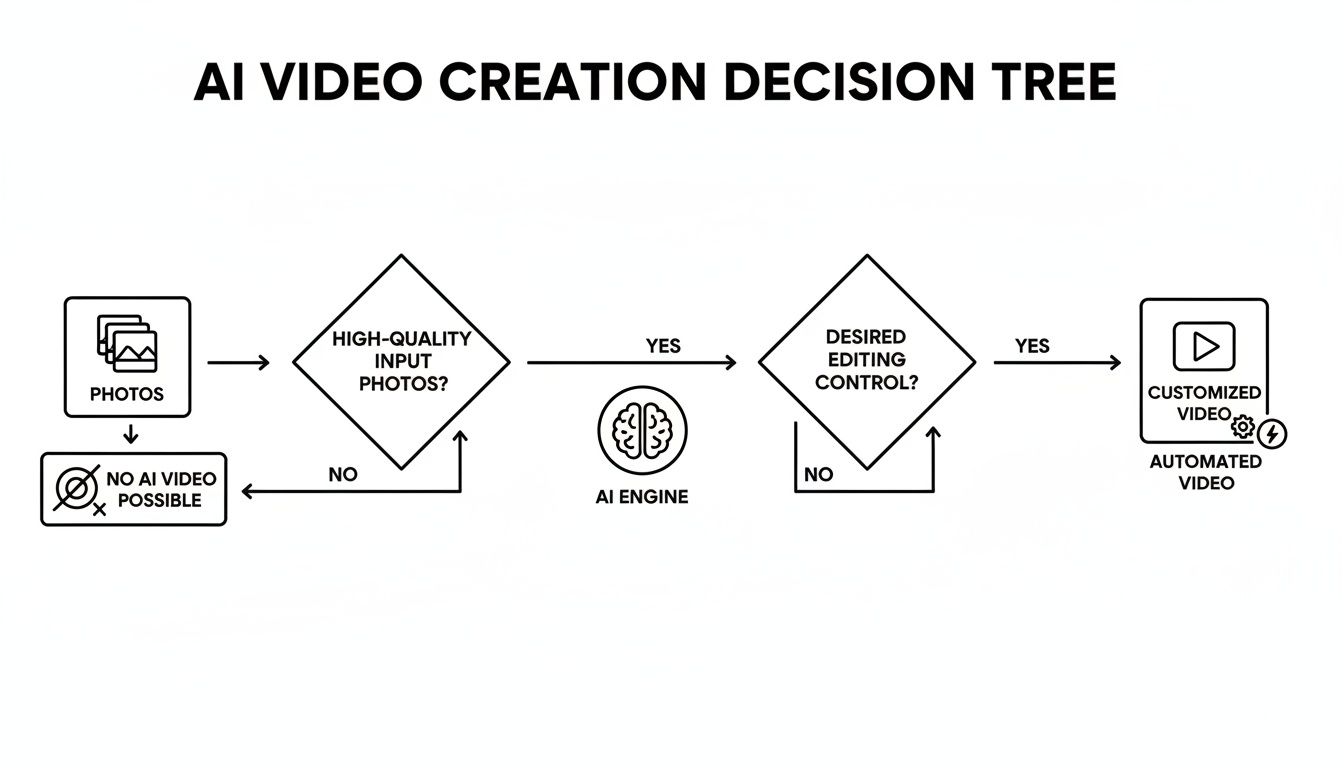
This straightforward workflow shows just how easy it is to add video marketing to every single property you list, without piling on extra time or costs.
The Right Tool for the Right Property
Let's be clear: a full 3D scan is still the gold standard for high-end luxury listings and architecturally unique properties. In those cases, buyers expect a fully interactive, self-guided experience.
But for the vast majority of listings, an AI video delivers a much better return on your investment. It's a fantastic, budget-friendly add-on for your photography packages and the perfect tool for properties where a full 3D walkthrough just isn’t practical.
Choosing the right tool for each job ensures your marketing is both effective and efficient. If you want to see how AgentPulse stacks up against other tools, check out our guide on the best AI video generators.
A Few Common Questions
Choosing the right virtual tour software usually sparks a few questions. Here are some straightforward answers to what we hear most often from agents, helping you pick the right tool for the job.
Do I Really Need a Special Camera?
It depends on the type of tour you want to create. If you're going for those fully immersive 3D walkthroughs from a platform like Matterport, then yes, a specialized 360° camera is a must-have to capture the space properly.
But for AI-powered video tour tools like AgentPulse, you don't need any new gear at all. You can use the high-quality photos you already have from your property photographer, which saves a lot of hassle and expense.
How Long Does This Actually Take?
The time commitment really swings from one software to another. A full 3D scan of a property can take a few hours on-site, not including the time it takes to process the files. If you're building a custom 360° tour and adding all the interactive elements yourself, plan on spending at least an hour or more in front of your computer.
AgentPulse was designed for speed. You can take your existing property photos and have a polished, professional video tour ready to go in under five minutes.
Can I Post These Tours on Social Media and the MLS?
This is a big one, and the answer comes down to two things: the file format and your marketing rights. Understanding the basics of AI social media content creation can help you figure out what kind of content performs best on different platforms.
Most solid platforms, AgentPulse included, give you full marketing rights. The key is to look for software that exports in a standard MP4 video file at 1080p resolution or higher. That format gives you the green light to upload it just about anywhere—Instagram, Facebook, YouTube, Zillow, and any MLS that accepts video.
Ready to turn your listing photos into eye-catching video tours in minutes? AgentPulse uses AI to create cinematic walkthroughs that get buyers to stop scrolling and pay attention.